MachinesFluent v1.1.4 adds a Scratchpad built for the moment when a thought is worth keeping but does not yet belong in an email, document, or task manager. Speak it, save it as a note, and decide what to do with it later. The release also makes saved History audio much smaller and fixes reliability problems around Windows restarts.
What changed
| Area | What changed | Why it matters |
|---|---|---|
| Scratchpad | Create notes manually, with a voice hotkey, or from History. | A useful thought can stay in MachinesFluent instead of being pasted somewhere too early. |
| Saved audio | New History audio uses compact Opus files. | Keeping optional audio takes far less disk space, while existing WAV recordings still work. |
| Windows reliability | License storage and Launch at Login were repaired. | Restarts and routine Windows changes are less likely to interrupt the app. |
Speak it now, decide where it belongs later
Dictation normally assumes you already know the destination. You open a document, place the cursor, and speak into it. Real thoughts are not always that organized. Sometimes you have an idea during another task, remember something worth keeping, or want to capture a rough note before deciding whether it belongs in a project, an email, or nowhere at all.
Scratchpad gives that thought a temporary home. Use the optional hotkey to record directly into a note without pasting into the application in front of you. You can also type a note manually or copy a useful transcript from History. Later, search the library, edit the note, copy it elsewhere, or delete it.
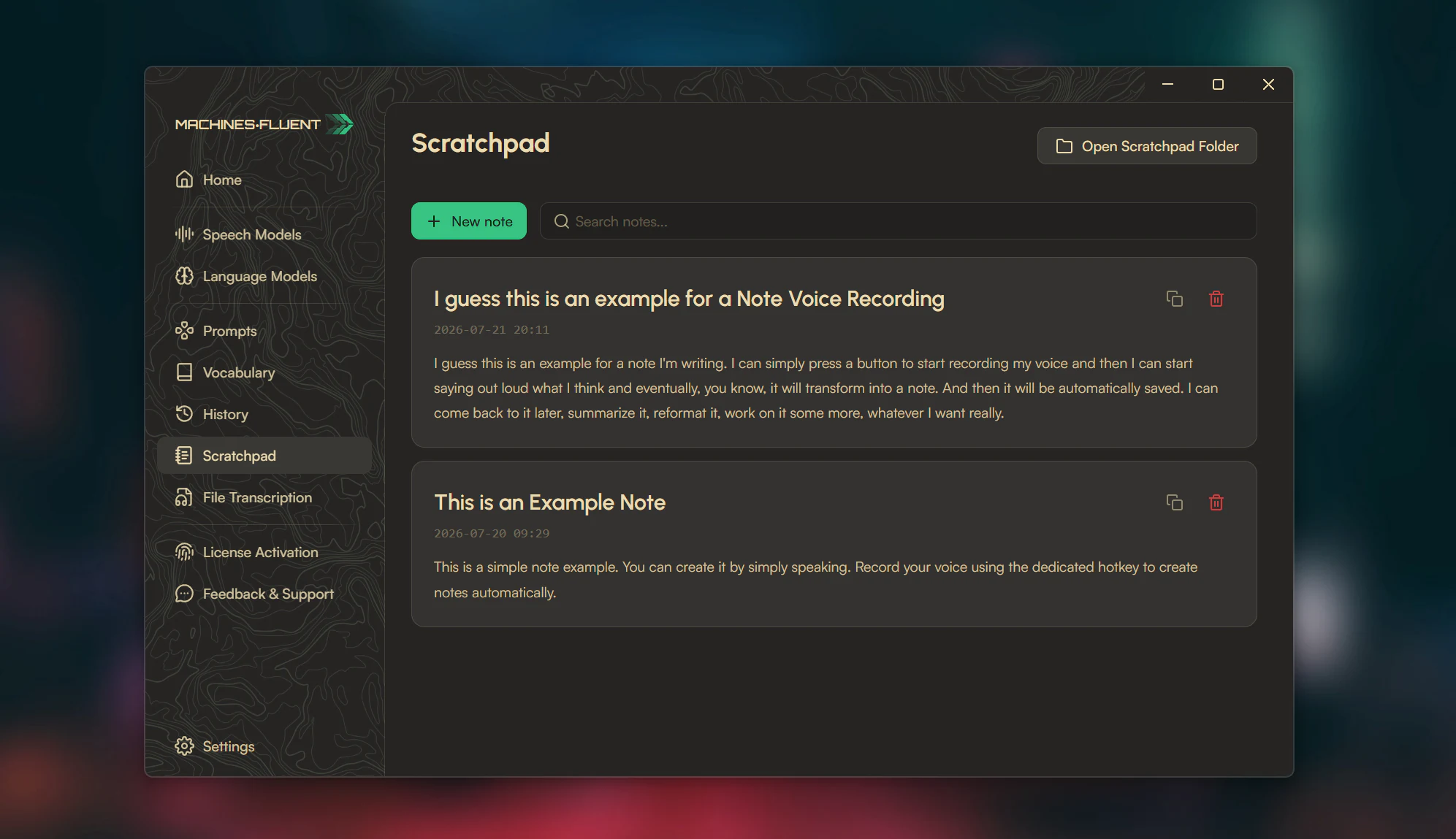
Scratchpad keeps voice-created notes visible and searchable, with direct access to the folder that stores them.
The notes are ordinary .txt files. There is no proprietary database and no attempt to turn MachinesFluent into a full knowledge-management platform. Scratchpad is deliberately smaller than that: a quick place for voice capture to land while the thought is still fresh.
Scratchpad, History, or the active app?
The three destinations solve different problems:
| Destination | Use it when | Do not use it as |
|---|---|---|
| Active app | You already know where the finished text belongs. | A temporary inbox when the current field is unrelated. |
| History | You need recovery, review, metadata, retry, or optional saved audio from a dictation event. | A carefully organized long-term notes system. |
| Scratchpad | A thought matters but its final destination is unknown. | A replacement for a full project, document, or knowledge-management tool. |
This distinction prevents a capture feature from becoming another pile of unprocessed information. Scratchpad should hold the thought long enough to decide whether it becomes a message, task, project note, prompt, or deletion.
A small processing habit keeps Scratchpad useful
Create notes quickly, but review them on a deliberate schedule. For each note:
- Delete it if the thought no longer matters.
- Edit it if the wording is too rough to understand later.
- Move or copy it into the real destination when the destination is now clear.
- Keep it in Scratchpad only when it remains useful as a simple text note.
Because the notes are ordinary text files, they remain inspectable outside a proprietary database. That makes the storage simple, but it also means local device security and backups are the user’s responsibility.
Smaller audio, fewer restart problems
If you choose to keep dictation audio in History, new recordings are now saved directly as compact Opus files instead of large WAV files. Existing WAV recordings still play and expire normally, so nothing in the old History library is stranded.
The release also fixes two problems that matter precisely because they should be invisible. Saved licenses now use Windows Credential Manager instead of depending on machine details that can change after an update. Launch at Login was repaired so it starts the complete app and no longer reports a false failure. Some users moving from the retired license-storage format may need to enter their key once.
Should you update?
Update to v1.1.4 if you regularly have thoughts that are worth capturing before they have a destination, keep audio with your dictation History, or use MachinesFluent automatically when Windows starts.
After updating, create one Scratchpad note with the voice hotkey. If it removes the need to open another app just to avoid losing a thought, the feature has done its job.
FAQ
What is MachinesFluent Scratchpad?
It is a voice-first library of ordinary text notes for thoughts that are worth keeping before they have a final destination.
Can I create a Scratchpad note without voice?
Yes. Notes can be typed manually, created with the optional voice hotkey, or copied from History.
Where are Scratchpad notes stored?
They are stored as ordinary .txt files, and the Scratchpad interface provides direct access to their folder.
Is Scratchpad a replacement for Obsidian, Notion, or a task manager?
No. It is deliberately smaller: a quick capture surface inside the dictation workflow.
Get the current version from MachinesFluent for Windows.
Continue from this release
Scratchpad solves capture before destination. Voice Typing Productivity: The Human Input Bottleneck explains why getting the thought out matters, and AI Dictation: From Speech to Clean, Structured Text covers the later step of turning that rough note into a usable form.
Source
- MachinesFluent public changelog, v1.1.4 release notes.