
MachinesFluent v1.1.0 is a dictation-loop update. It adds Soniox and ElevenLabs as real-time cloud speech engines, makes Hands Free work with Smart Dictation, adds local vocabulary snippets, and improves the feedback around batch transcription and previews. Update if you want more speech-engine choice, dictate longer thoughts through a saved prompt, or repeatedly say the same names and phrases.
What changed in v1.1.0
| Area | What changed | Why it matters |
|---|---|---|
| Cloud speech | Soniox and ElevenLabs are new real-time cloud speech engines. | You have more engines to test against your language, microphone, and workflow. |
| Hands Free | Hands Free can now finish a buffered recording through Smart Dictation. | A longer spoken thought can become a prompt-shaped result without holding a key. |
| Vocabulary snippets | Spoken triggers can expand into saved text locally after transcription. | Repeated phrases, boilerplate, and names require less cleanup. |
| Local batch speech | Faster Whisper follows the pause-gated batch rhythm used by Parakeet; Parakeet handles weak tails more carefully. | Pauses and quiet endings behave more predictably. |
| Feedback and settings | Preview modes, speech-engine grouping, provider menus, and Lite-model wording are clearer. | It is easier to see what the app will do before you start speaking. |
Choose the speech path that fits the job
v1.1.0 adds Soniox and ElevenLabs to the cloud speech-engine list. This is not a promise that one provider will be best for every person. Accent, language, microphone quality, room noise, vocabulary, and the way you pause all change the result. The practical win is more choice inside the product rather than one forced cloud route.
The release also improves local batch dictation. Processing cues are clearer, quiet input is handled more reliably, and weak background noise is less likely to produce unwanted text at the end of a recording.
For a user, that translates into a simple test: use the same difficult paragraph with your usual engine and one new engine, then try it with the pauses you actually make in conversation. Do not decide from a clean demo sentence.
Turn a longer thought into the right output
Hands Free used to be mainly a live-dictation choice. In v1.1.0, it can also work with Smart Dictation. With Smart Dictation enabled, the first tap starts a buffered recording and the next tap finishes it; the completed transcript then goes through the selected prompt. When Smart Dictation is off, Hands Free keeps its existing live-paste behavior.
That changes the right use case. Instead of trying to speak a finished email, note, or structured update in one perfect pass, you can dictate the rough thought and let a saved prompt apply the shape afterward. The boundary matters: Smart Dictation works from the completed transcript. It does not read the clipboard or combine the transcript with a separate spoken command.
This is most useful for people who already repeat a format: a status update, a client reply, meeting notes, an outline, or a technical explanation. It is less useful for the quick one-line insertion where Press & Hold is still the more direct interaction.
Stop retyping phrases you say every day
Vocabulary snippets are the other obvious daily-use feature in v1.1.0. A snippet maps a short spoken trigger to a longer saved replacement. After finalized transcription, the app expands that trigger locally. It does not need an AI request, and it is not the same thing as a cloud provider vocabulary hint.
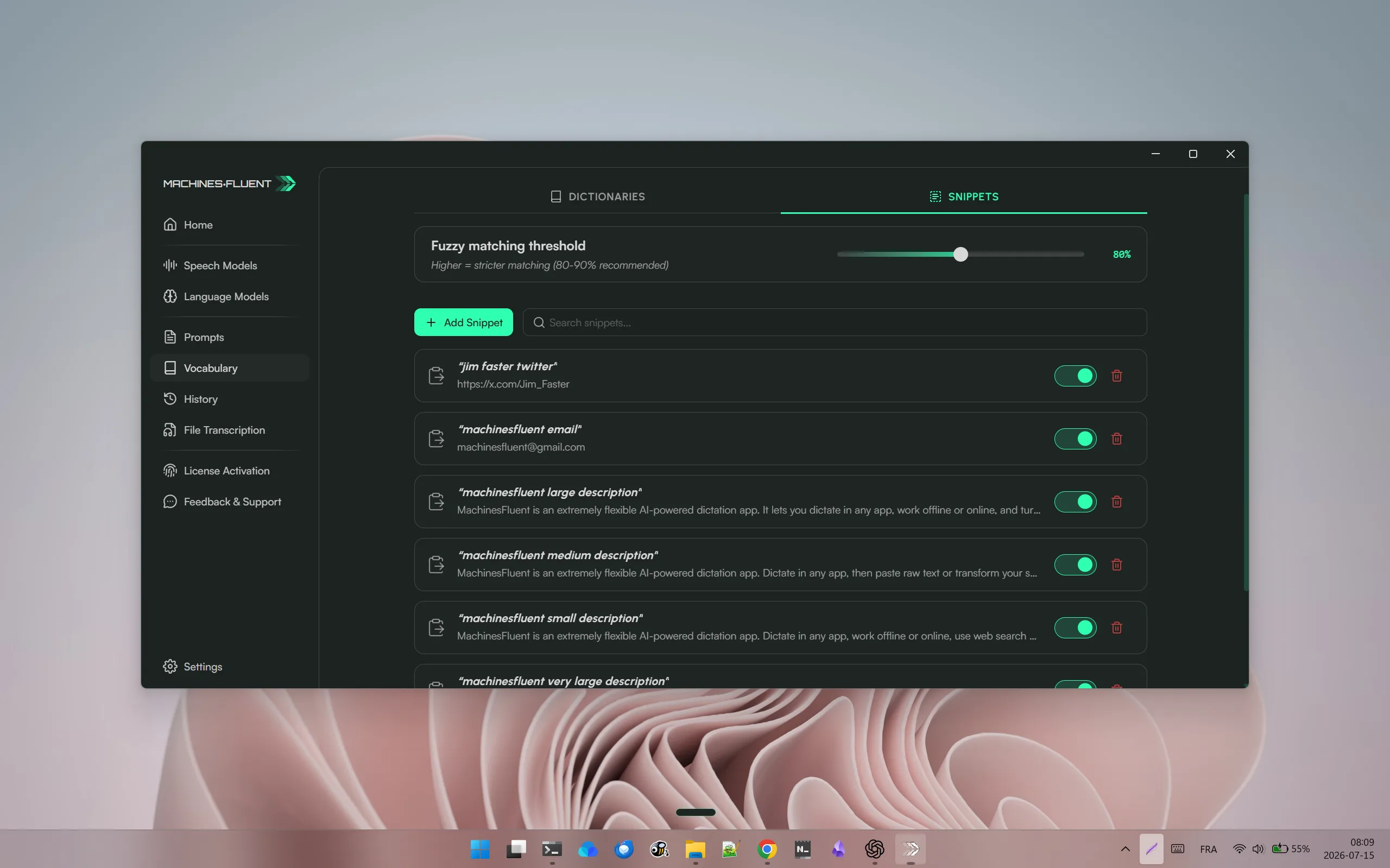
The Snippets tab stores spoken triggers and their exact replacements, with fuzzy matching and individual enable controls.
Use snippets for things that should always come out exactly the same: a product name, a sign-off, a repeated response, a project code, a multi-line template, or a phrase your speech engine hears correctly but that you do not want to dictate in full.
The distinction is worth keeping. A dictionary can repair known variants or give a supported cloud engine a recognition hint. A snippet is deterministic expansion after transcription. If the goal is "when I say this short trigger, paste this exact block," use a snippet.
See what the app is doing sooner
The rest of v1.1.0 is mostly clarity and reliability work around the dictation loop. Transcription Preview now has one master toggle and a clear choice of Press & Hold, Hands Free, or both. Batch engines can surface completed chunks after inactivity without duplicating cumulative provider text. Speech settings are grouped into offline, legacy, and cloud sections, and the dock processing cue now covers batch-style Faster Whisper work.
There are small but meaningful fixes on the AI side too. The preview no longer treats ordinary prices such as dollar amounts as inline mathematics, unsupported image requests receive a clearer failure hint, and blocked requests no longer leave the preview stuck loading. Provider icons, prompt-card cursor feedback, Lite-model wording, and refreshed onboarding defaults all reduce uncertainty rather than adding a headline feature.
Choose between dictionaries, snippets, and Smart Dictation
v1.1.0 puts three kinds of correction near each other, but they solve different problems:
| Tool | Use it when | Example |
|---|---|---|
| Dictionary | The speech engine repeatedly hears a known term incorrectly or needs a vocabulary hint. | A client surname, acronym, product name, or technical term. |
| Snippet | A short spoken trigger should expand into exact saved text after transcription. | A standard sign-off, address, project code, response template, or multi-line block. |
| Smart Dictation | The completed thought needs transformation rather than exact substitution. | Turn rough speech into an email, structured update, translation, or named format. |
Do not use an AI prompt to solve a deterministic replacement when a snippet can produce the exact text. Do not use a large snippet when the result needs to change with the thought. Do not expect a dictionary entry to create an entire template. Choosing the narrowest tool reduces surprises and makes the workflow easier to debug.
A sensible speech-engine comparison
Adding Soniox and ElevenLabs does not create one universally best engine. Test every candidate with the same microphone, environment, language, vocabulary, and length of speech. Compare first-word capture, pauses, punctuation, proper names, quiet endings, and the delay before usable output.
Local and cloud engines also have different operating costs. A local engine needs the model and machine resources but can avoid a network round trip. A cloud engine can offer a different quality or streaming profile but requires configuration, connectivity, and the provider’s data route. The correct engine is the one that fits the job, not the newest item in the list.
Should you update?
Update now if you use cloud speech and want to try Soniox or ElevenLabs; use Smart Dictation with Hands Free; or repeatedly dictate standard phrases that are now better handled as snippets. Also update if you have noticed awkward completion behavior around pauses or quiet endings in local batch speech.
If you mostly use one stable engine and simple push-to-talk dictation, the release still improves preview and processing feedback even when you do not change your setup.
After updating, test one new speech engine, one Hands Free Smart Dictation prompt, and one snippet. That gives you a faster answer than reading every release bullet twice.
FAQ
What did MachinesFluent v1.1.0 add?
The main additions are Soniox and ElevenLabs real-time cloud speech engines, Hands Free support for Smart Dictation, local vocabulary snippets, and clearer preview and processing behaviour.
Are snippets the same as dictionary entries?
No. A dictionary helps recognition or corrects known variants. A snippet expands a spoken trigger into exact saved text after transcription.
Does Hands Free Smart Dictation require every dictation to use AI?
No. Raw dictation remains available. Smart Dictation is the path for a completed capture that should pass through a selected prompt before insertion.
Should I change speech engines after updating?
Only after testing. Keep a stable engine when it already handles your language, microphone, vocabulary, and latency well. The new engines expand the choice; they do not invalidate an existing route.
Try the update from MachinesFluent for Windows. The release is most valuable when it removes a repeated step from the way you actually dictate.
Continue from this release
Hands Free Smart Dictation matters because a transcript is not always the finished work. Read AI Dictation: From Speech to Clean, Structured Text for the workflow behind that feature. Local AI Models Change the Privacy Risk Profile explains what engine and provider choice changes, while the Windows dictation software buyer guide puts those choices beside the other products people evaluate. For the design reason behind clearer previews and processing cues, read Designing Voice Feedback That Feels Physical.
Source
- MachinesFluent public changelog, v1.1.0 release notes.